This article has been translated by Gemini.
I recently did something like the title suggests, so I’ll summarize it as a rough memo. This is just an introduction to how I set it up this time, so there are probably many other ways. Please take it as just one example.
What I wanted to achieve this time:
- Publish a library module (not an Android module) containing several
.ktfiles. - Pass the GitHub username and token for using GitHub Packages via GitHub Actions.
- Match the library version to the tag name.
maven-publish Setup#
First, configure the settings for publishing. I used the maven-publish plugin this time. There seem to be other third-party plugins as well.
Write the following in the build.gradle of the library module you want to publish (I wrote this in Groovy, but it should be similar in .kts):
// library/build.gradle

plugins {
    id 'kotlin'
    id 'maven-publish'
}
Also, include the maven-publish setup in the same build.gradle.
// library/build.gradle

// Set values dynamically via GitHub Actions (if dynamic setting is not needed, describe directly in gradle)
def releaseVersion = System.getenv("RELEASE_VERSION")
def credentialUserName = System.getenv("GITHUB_PACKAGE_USER_NAME")
def credentialPassword = System.getenv("GITHUB_PACKAGE_TOKEN")

publishing {
    publications {
        maven(MavenPublication) {
            groupId "YOUR_GROUP_ID"
            artifactId "YOUR_ARTIFACT_ID"
            version releaseVersion
            from components.java
        }
    }
    repositories {
        maven {
            name = "GitHubPackages"
            url = uri("https://maven.pkg.github.com/YOUR_ORG_NAME/YOUR_REPOSITORY_NAME")
            credentials {
                username = credentialUserName
                password = credentialPassword
            }
        }
    }
}
As an aside, these settings can be extracted to a separate file. For example, describe the settings in a separate gradle file named publish.gradle and apply it to build.gradle using apply.
// library/build.gradle

plugins {
    id 'kotlin'
    id 'maven-publish'
}

apply from: "./publish.gradle" // To load publish.gradle in the same directory as build.gradle
After setting up the maven-publish plugin and successfully completing Gradle Sync, the publish Gradle command becomes available. Ultimately, we use this command to publish the library to Maven.
maven-publish Setup Tips or Cautions#
Publishing an Android Module#
I haven’t tried this, but if you’re publishing an AAR, you might need some additional setup. Build Android Library with GitHub Actions and Publish to GitHub Packages - Qiita
GitHub User Permissions#
In the settings for publishing to GitHub Packages, there’s a place to specify username. Ensure the specified user has access permissions to the repository (might not be required?) and Write permission to GitHub Packages. (I forgot what kind of error occurs if permissions aren’t granted, sorry…)
// library/build.gradle
    repositories {
        maven {
            name = "GitHubPackages"
            url = uri("https://maven.pkg.github.com/YOUR_ORG_NAME/YOUR_REPOSITORY_NAME")
            credentials {
                username = YOUR_USER_NAME // Ensure the specified user has access permissions to the repository
                password = YOUR_PASSWORD
            }
        }
    }
GitHub Actions Setup#
Next, the GitHub Actions configuration. The following YAML roughly performs these processes in order:
- Push to
mainbranch. - Bump the tag version.
- Publish using the bumped tag value as the release version.
For those interested in the details of each Action used in the steps, you can find the documentation by searching for the Action name.
name: Publish library module
on:
  push:
    branches:
      - main
jobs:
  publish-library:
    runs-on: ubuntu-latest
    steps:
      - name: Checkout library repository
        uses: actions/checkout@v2
      - name: Bump up tag version # Bump tag version
        id: bump_tag_version
        uses: anothrNick/github-tag-action@1.26.0
        env:
          GITHUB_TOKEN: ${{ secrets.GITHUB_TOKEN }}
          RELEASE_BRANCHES: main
      - name: Prepare for gradle command execution
        uses: actions/setup-java@v1
        with:
          java-version: 11
      - name: Execute gradle command to publish
        env: # Set environment variable values used in the library module's gradle file
          RELEASE_VERSION: ${{ steps.bump_tag_version.outputs.new_tag }}
          GITHUB_PACKAGE_USER_NAME: YOUR_USER_NAME
          GITHUB_PACKAGE_TOKEN: ${{ secrets.GITHUB_TOKEN }}
        uses: eskatos/gradle-command-action@v1
        with:
          arguments: library:assemble library:publish # Execute maven-publish command
(The last assemble command might be unnecessary.)
For general GitHub Actions info, the official documentation and tutorials are substantial: GitHub Actions Documentation
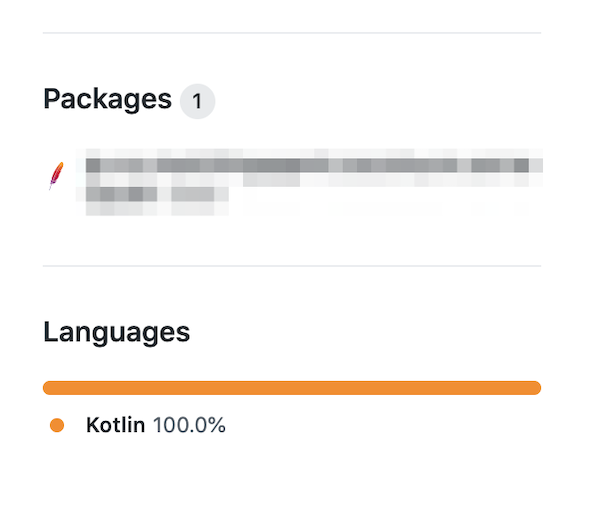
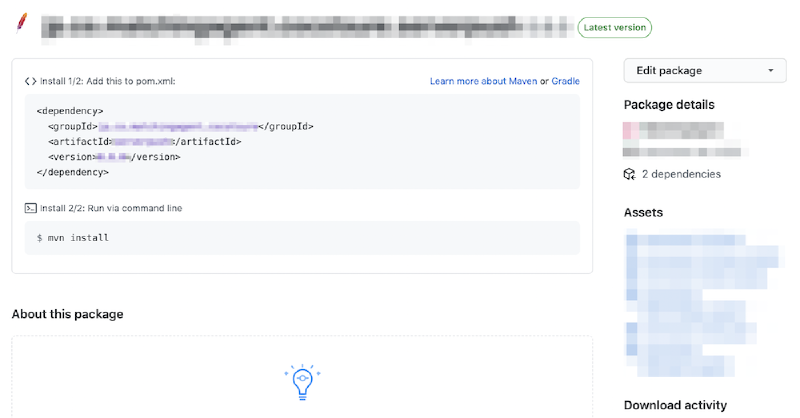
Once successfully published to GitHub Packages, you can check the published Package on the repository screen.
GitHub Actions Setup Tips#
workflow_dispatch#
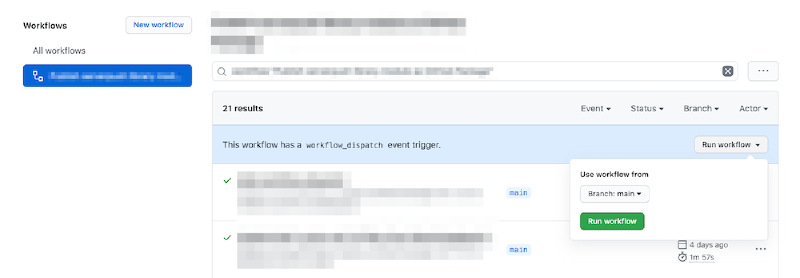
In GitHub Actions, processes are basically executed in response to Git events like push. However, by defining the workflow_dispatch event in the workflow YAML, you can manually trigger specific workflows. This is useful for debugging.
You can execute it from the individual Workflow detail page under Repository > Actions tab > All Workflows. If it’s hard to find, refer to the screenshot.
Events that trigger workflows - GitHub Docs
Library Module Loading Setup#
Next, settings for using the published Package. This explanation assumes use in an Android app.
Add the following to the project root build.gradle:
allprojects {
  repositories {
    ...
    maven {
        name = "GitHubPackages"
        url = uri("https://maven.pkg.github.com/YOUR_ORG_NAME/YOUR_REPOSITORY_NAME")
        credentials {
          username = YOUR_USER_NAME
          password = YOUR_PASSWORD
        }
    }
...
Once the above settings are correctly completed, you are ready to use the library. For example, if the library is published with the following info:
<groupId>jp.co.hogehoge.fugafuga</groupId>
<artifactId>library</artifactId>
<version>0.1.0</version>
You should be able to use it by specifying it like this:
implementation "jp.co.hogehoge.fugafuga:library:0.1.0"Library Module Loading Setup Cautions#
GitHub User Permissions#
As mentioned above, ensure the user specified in username has access permissions to the repository (might not be required?) and Write permission to GitHub Packages. I got stuck on this.
Setting up Username and Token when using the Library (Update)#
When using a library published on GitHub Packages, a GitHub token is required. I chose a policy of setting values dynamically without version-controlling them, just in case.
Create a file like github-packages.properties that only holds strings:
NAME=xxx
TOKEN=xxx
I keep this file gitignored locally and use it.
For CI, I currently use both GitHub Actions and Bitrise:
- GitHub Actions: Save the username and token values in Secrets and write them to the properties file.
- Bitrise: Upload this properties file in advance and download/use it within the Bitrise workflow.
Summary#
I’ve roughly described how I published a library using:
maven-publishplugin- GitHub Actions
- GitHub Packages
Using GitHub Actions, you can set it up to automatically:
- Update library dependency versions with Dependabot.
- Bump the GitHub Packages module version by creating a tag.
- Send version update PRs to repositories using the library module.
It’s very convenient. That’s all! If there are mistakes or unnecessary descriptions, please let me know 🙏