This article was translated from Japanese by Claude Code.
What is BottomNavigationView?#
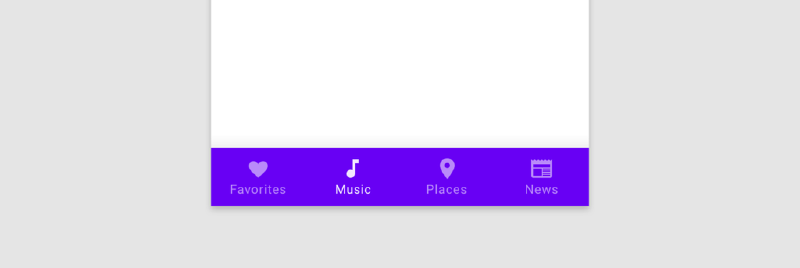
A component that enables navigation to major destinations within an app.
I think it’s called “Bottom"Navigation because of the feature of placing buttons at the bottom of the screen as shown in the screenshot above.
For details on BottomNavigation, please see the official site.
Want to Control BottomNavigationItemView Long Press Behavior#
If you simply use BottomNavigation without special processing and inflate and display a Menu, when you long-press an item, a Tooltip is displayed.

(The screenshot above is from the Google Pay app.)
This might be a rare case (or perhaps it’s not recommended from an accessibility perspective), but for example, if you absolutely want to hide this Tooltip or want to perform custom processing when a user long-presses an item, here’s how you can do it. It’s more of a memo.
By the way, when I checked earlier, the Twitter app doesn’t display a Tooltip on long-press, so if it uses BottomNavigationView, it’s likely performing some control.
First, writing just the code, you can control it like this:
bottomNavigation.menu.forEach {
  val view = bottomNavigation.findViewById<View>(it.itemId)
  view.setOnLongClickListener {
    // Perform desired processing
    true
  }
}
In the second half of this article, I’ll look at the internal code of BottomNavigationView.
How is the Tooltip Displayed?#
As mentioned at the beginning, when using BottomNavigationView, this Tooltip is displayed as standard behavior when long-pressed. Let me trace through how this Tooltip is displayed.
The version of Material Components containing the BottomNavigationView being traced:
com.google.android.material:material:1.2.0-alpha05
BottomNavigationView#inflateMenu#
First, when defining BottomNavigationView in XML, you specify a menu. (You can also call the inflateMenu function from code.)
<com.google.android.material.bottomnavigation.BottomNavigationView
        android:id="@+id/bottomNavigation"
        android:layout_width="0dp"
        android:layout_height="wrap_content"
        ...
        app:menu="@menu/bottom_navigation_menu"
        />
When you do this, the inflateMenu function is called within the BottomNavigationView constructor.
public void inflateMenu(int resId) {
    presenter.setUpdateSuspended(true);
    getMenuInflater().inflate(resId, menu);
    presenter.setUpdateSuspended(false);
    presenter.updateMenuView(true);
}BottomNavigationPresenter#updateMenuView#
Within BottomNavigationView.inflateMenu, the inflate function of the MenuInflater class is called to inflate the Menu. Also, several functions of a Presenter class called BottomNavigationPresenter are called.
What I want to focus on is BottomNavigationPresenter.updateMenuView. Let me look at this function.
@Override
  public void updateMenuView(boolean cleared) {
    if (updateSuspended) {
      return;
    }
    if (cleared) {
      menuView.buildMenuView();
    } else {
      menuView.updateMenuView();
    }
  }
Within BottomNavigationView.inflateMenu, there’s a call:
presenter.updateMenuView(true);So the cleared parameter gets true. Therefore, if the updateSuspended field value is not true, this block executes:
menuView.buildMenuView();BottomNavigationItemView#initialize#
Within the BottomNavigationMenuView.buildMenuView function, each View (=BottomNavigationItemView) to be displayed in BottomNavigationView is initialized. Excerpting in part, it looks like this:
BottomNavigationItemView child = getNewItem();
      ...
      child.initialize((MenuItemImpl) menu.getItem(i), 0);
      child.setItemPosition(i);
      child.setOnClickListener(onClickListener);
      if (selectedItemId != Menu.NONE && menu.getItem(i).getItemId() == selectedItemId) {
        selectedItemPosition = i;
      }
      setBadgeIfNeeded(child);
      addView(child);
Here, setOnClickListener is called, but setOnLongClickListener etc. for long-press is not called. So I read the code inside BottomNavigationItemView.initialize. Extracting the whole thing…
@Override
  public void initialize(@NonNull MenuItemImpl itemData, int menuType) {
    this.itemData = itemData;
    setCheckable(itemData.isCheckable());
    setChecked(itemData.isChecked());
    setEnabled(itemData.isEnabled());
    setIcon(itemData.getIcon());
    setTitle(itemData.getTitle());
    setId(itemData.getItemId());
    if (!TextUtils.isEmpty(itemData.getContentDescription())) {
      setContentDescription(itemData.getContentDescription());
    }

    CharSequence tooltipText = !TextUtils.isEmpty(itemData.getTooltipText())
        ? itemData.getTooltipText()
        : itemData.getTitle();
    TooltipCompat.setTooltipText(this, tooltipText);
    setVisibility(itemData.isVisible() ? View.VISIBLE : View.GONE);
  }
I can see the word tooltipText here. It seems like something is being done here.
TooltipCompat.setTooltipText#
CharSequence tooltipText = !TextUtils.isEmpty(itemData.getTooltipText())
  ? itemData.getTooltipText()
  : itemData.getTitle();
TooltipCompat.setTooltipText(this, tooltipText);
TooltipCompat.setTooltipText has an appropriate-sounding name. Looking at the internals:
public static void setTooltipText(@NonNull View view, @Nullable CharSequence tooltipText) {
        if (Build.VERSION.SDK_INT >= 26) {
            view.setTooltipText(tooltipText);
        } else {
            TooltipCompatHandler.setTooltipText(view, tooltipText);
        }
    }
If the SDK version is 26 or higher, View.setTooltipText is called.
TooltipCompatHandler.setTooltipText#
if (Build.VERSION.SDK_INT >= 26) {
  view.setTooltipText(tooltipText);
} else {
  TooltipCompatHandler.setTooltipText(view, tooltipText);
}
Let me look at the TooltipCompatHandler.setTooltipText processing that executes in the else branch.
if (TextUtils.isEmpty(tooltipText)) {
            if (sActiveHandler != null && sActiveHandler.mAnchor == view) {
                sActiveHandler.hide();
            }
            view.setOnLongClickListener(null);
            view.setLongClickable(false);
            view.setOnHoverListener(null);
        } else {
            new TooltipCompatHandler(view, tooltipText);
        }
If tooltipText is empty, it’s calling setOnLongClickListener(null) on the view. If tooltipText is not empty, it’s initializing the TooltipCompatHandler class. This class constructor seems to be doing something.
TooltipCompatHandler#
private TooltipCompatHandler(View anchor, CharSequence tooltipText) {
        mAnchor = anchor;
        mTooltipText = tooltipText;
        mHoverSlop = ViewConfigurationCompat.getScaledHoverSlop(
                ViewConfiguration.get(mAnchor.getContext()));
        clearAnchorPos();

        mAnchor.setOnLongClickListener(this);
        mAnchor.setOnHoverListener(this);
    }
The above constructor is being executed. It calls setOnLongClickListener on the View passed in as arguments and sets itself as the Listener. As you might guess, TooltipCompatHandler implements View.OnLongClickListener.
@Override
    public boolean onLongClick(View v) {
        mAnchorX = v.getWidth() / 2;
        mAnchorY = v.getHeight() / 2;
        show(true /* from touch */);
        return true;
    }
I’ve realized that for SDK versions less than 26, this code seems to be executed.
So, going back to what I originally wanted to do, it seems like I just need to override the setOnLongClickListener on the View that gets passed here. The View that gets passed here is the BottomNavigationItemView that was being initialized inside the BottomNavigationMenuView.buildMenuView function. These Views can be accessed through the getItem function of the Menu obtained via BottomNavigation.getMenu function. While this works for getting a single Menu item, for example, if you want to access all Menu items, the androidx.core:core-ktx library has convenient Kotlin extension functions available, which you can utilize.
/** Performs the given action on each item in this menu. */
inline fun Menu.forEach(action: (item: MenuItem) -> Unit) {
    for (index in 0 until size()) {
        action(getItem(index))
    }
}
Using the above extension function, you can ultimately control BottomNavigationItemView long-press processing with code like this:
bottomNavigation.menu.forEach {
  val view = bottomNavigation.findViewById<View>(it.itemId)
  view.setOnLongClickListener {
    // Perform desired processing
    true
  }
}
That’s all. If you find any mistakes or have feedback, I’d appreciate if you could let me know via comments or Twitter DMs 🙏
Reference Links#
- Reference Stack Overflow
BottomNavigation material.io
Tooltips developer.android.com